
When folks think about cybersecurity, they often picture strong passwords, antivirus programs, and maybe steering clear of sketchy emails. That’s just the tip of the iceberg.
But here’s the real deal:
Today’s cyberattacks don’t just go after weak passwords; they take advantage of your habits, your need for convenience, and even things you might not consider at all.
This blog dives into the lesser-known cybersecurity threats that many people overlook and shares how you can stay one step ahead of them.
01:Your Browser Extensions Might Be Watching You
Browser extensions feel harmless. After all, they add features, right?
Not exactly.
Many extensions request permission to:
- Read everything you type
- Access your browsing history
- Capture session cookies
Even worse, some legitimate extensions are later sold to malicious developers, turning them into silent spyware.
What you should do:
Review your extensions regularly and remove anything you don’t absolutely need.
02: “Sign in with Google” Isn’t Always Safe
That quick “Continue with Google” button saves time, but it also creates a chain of trust.
If your main account is compromised, attackers can:
- Access multiple connected apps
- Extract personal data from linked services
What you should do:
Audit third-party app access in your accounts and remove anything you no longer use.
03:Your Old Accounts Are Still a Threat
That random website you signed up for years ago? It might already be breached.
Attackers use a technique called Credential Stuffing:
- They take leaked usernames and passwords
- Try them on popular platforms
- Gain access if you reused credentials
What you should do:
Delete unused accounts and avoid reusing passwords across platforms.
04:Public Wi-Fi Isn’t Just “Risky”, It’s Designed to Trap You
Public Wi-Fi doesn’t just expose you to nearby hackers.
Attackers can create fake hotspots(Evil Twin) that look legitimate, tricking you into connecting. Once connected, they can:
- Intercept your data
- Redirect you to phishing pages
- Monitor your activity
What you should do:
Avoid logging into sensitive accounts on public Wi-Fi and use a trusted VPN when necessary.
05:Your Phone Number Is a Weak Link
Many people rely on SMS-based verification for security.
But attackers can perform SIM swap attacks, taking control of your phone number and receiving your OTPs.
What you should do:
Use authenticator apps instead of SMS for two-factor authentication, and enable SIM security with your provider.
06:PDFs Aren’t Always Safe
PDF files are often seen as harmless, but they can contain:
- Embedded scripts
- Malicious links
- Exploits targeting outdated software
What you should do:
Never open unexpected PDF attachments, even if they look official.
07:Auto-Fill Can Leak Your Personal Data
Auto-fill makes life easier, but it can also expose your data.
Some websites use hidden fields to capture:
- Email addresses
- Phone numbers
- Saved credentials
What you should do:
Disable auto-fill for sensitive data or use manual fill through a password manager.
08:Smart Devices Can Be Silent Entry Points
Your smart TV, camera, or even light bulbs can be exploited.
Most IoT devices:
- Use default passwords
- Rarely receive updates
- Have weak security
What you should do:
Change default credentials and keep these devices on a separate Wi-Fi network.
09:Even URLs Can Trick You
Not all fake websites look fake.
Attackers use:
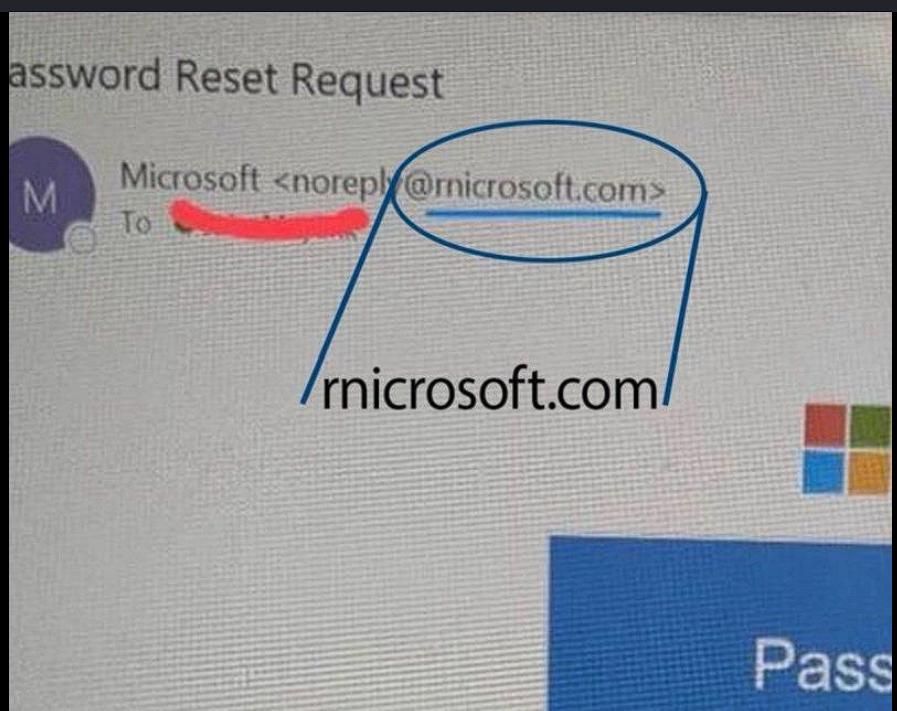
- Typosquatting (slightly misspelled domains)
- Lookalike characters from different languages
What you should do:
Bookmark important websites instead of typing URLs every time.
10: Screenshot Can Leak More Than You Think
A simple screenshot can accidentally expose:
- Personal details
- Open tabs
- Hidden metadata like location
What you should do:
Always review and crop screenshots before sharing them online.